🗓️
2022
–
2025
Export Service
Account and access platform for Australia's export industry. I led end-to-end design serving 2,000+ regulated businesses, reducing registration times and simplifying compliance.
Client
Department of Agriculture, Fisheries and Forestry (DAFF).
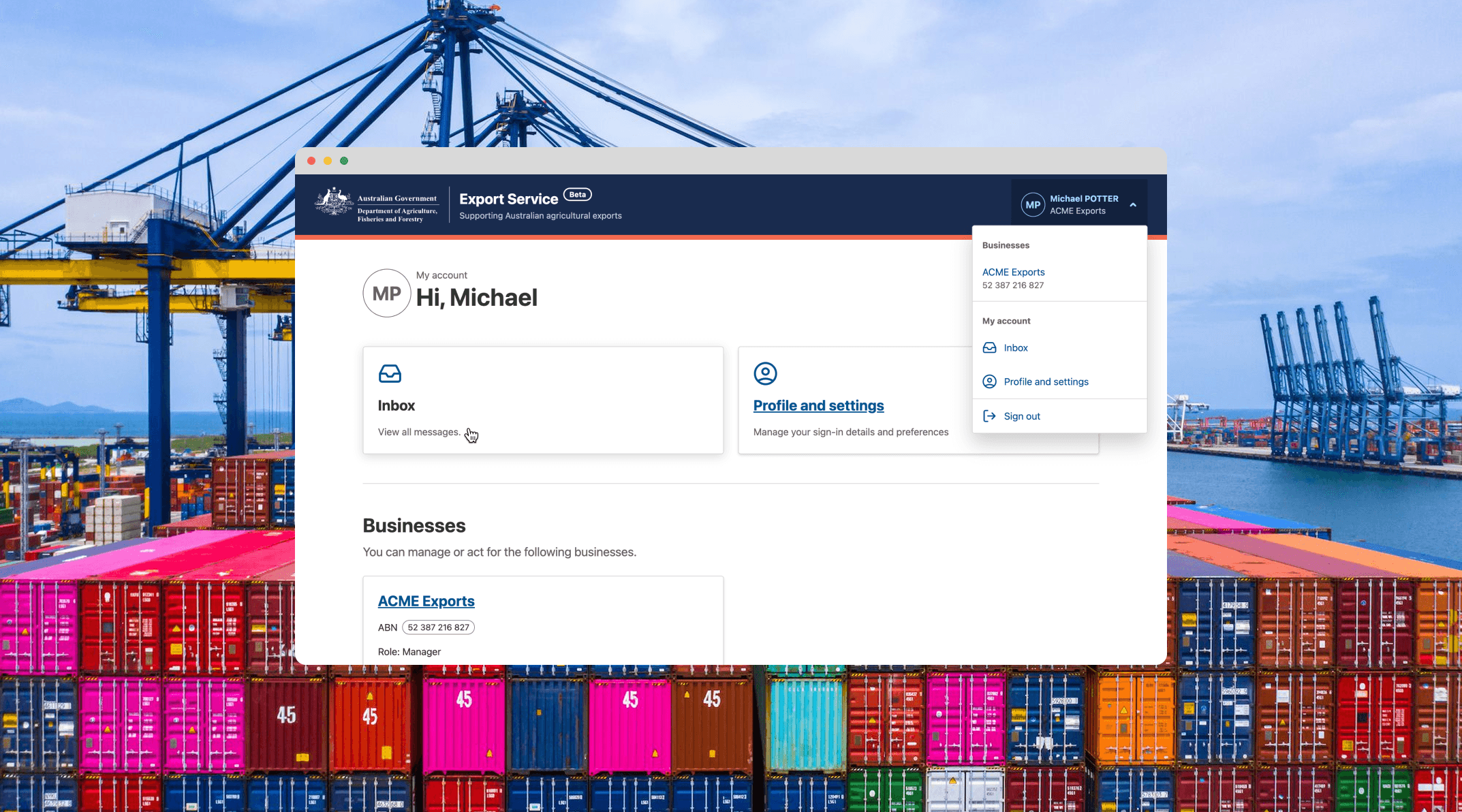
Overview
Exporters struggled with fragmented department systems that required multiple logins, duplicate forms, and offered limited visibility into application status. This created frequent support calls and administrative burden for both exporters and department staff, who found it difficult to validate information and make timely decisions. A centralised platform was needed, but consolidating protected business data and updating legacy systems introduced security challenges.
What we built
The Export Service provides a single platform for exporters to manage documentation and regulatory obligations. Users can onboard, set communication preferences, verify business authorisations, manage staff permissions, update account details, and track application status, streamlining previously fragmented workflows.
Role and responsibilities
As design lead for a 16+ person multidisciplinary team, I drove product innovation through collaboration with business units and digital specialists:
Created UI designs supporting user testing and development handover
Led research that defined build requirements through user feedback and data
Prioritised design backlogs with the product manager to align with business objectives
Facilitated stakeholder collaboration to maintain platform consistency and product vision
The core challenge was balancing security requirements with usability. Working with user researchers and business analysts, I produced wireframes and prototypes tested with exporters and department stakeholders. Insights directly informed iterations and shaped the product roadmap.
I delivered responsive, WCAG 2.1 conforming interfaces using the Agriculture Design System aligned to the Digital Service Standard. I contributed to the design and developer community through forums and guilds, sharing concepts and incorporating peer feedback.
Designing for efficiency and clarity
Users needed a way to avoid repetitive data entry. Guided by the government principle of 'tell us once', the account enables centralised profile management. Details entered once are reused seamlessly across forms and system integrations.
Before committing to code, I used the department's Agriculture Design System to create Figma prototypes for concept validation and testing. Because business units manage relationships with exporters, we began by validating early concepts with them.
Next, we developed a research script and ran moderated usability sessions with exporters to gather feedback. Participants were recruited through Askable, giving us direct access to real users and ensuring insights reflected actual user needs.
Navigation
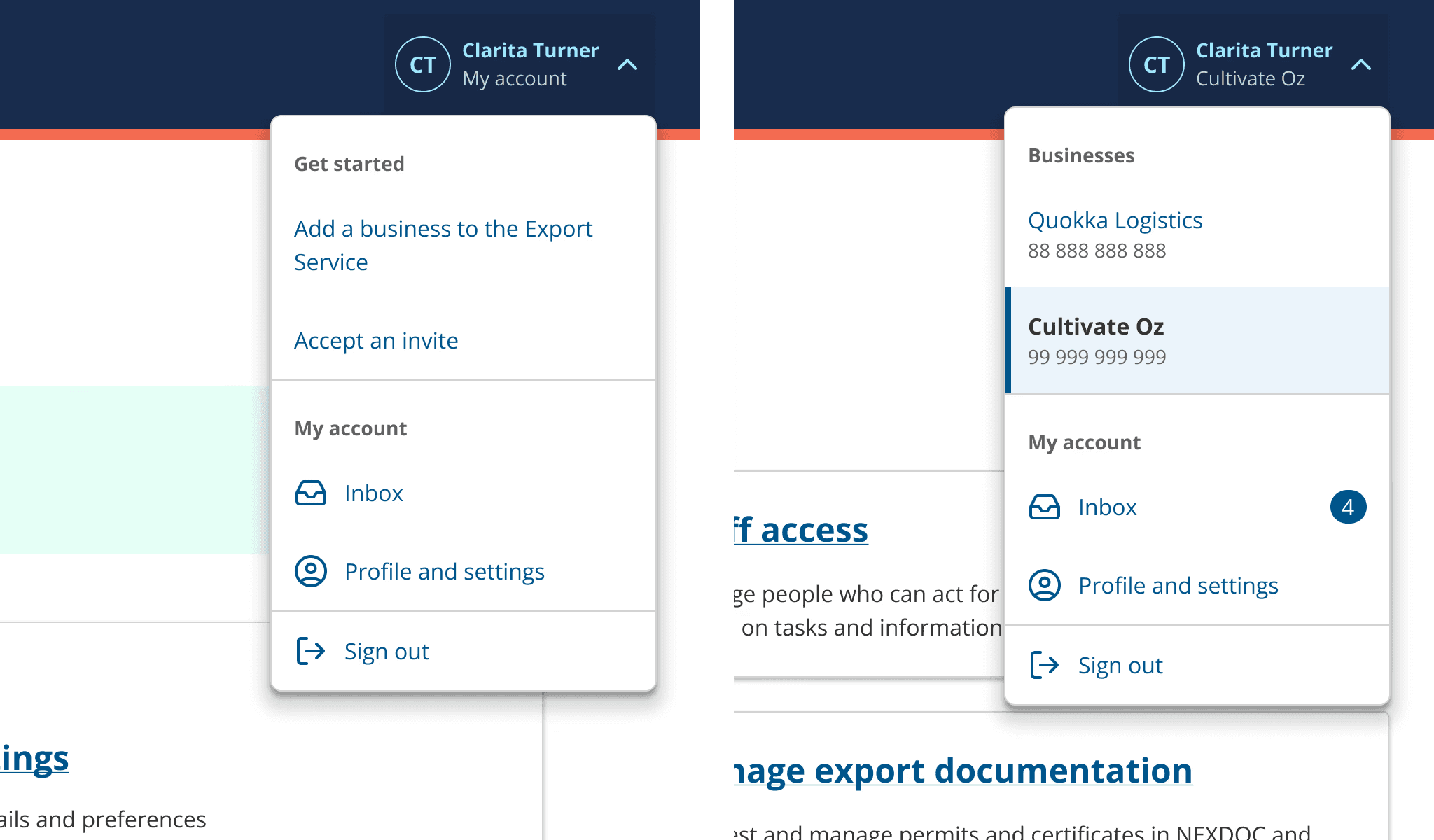
The user's profile and account settings are always accessible via persistent navigation in the top-right corner of the interface. I designed new components to support this, including a Dropdown menu for for switching between multiple businesses and a navigation system that remains consistent across the platform.
Because the platform is context-driven, users needed to clearly see which business they were acting on behalf of when making decisions or completing tasks. This visibility helps reduce errors and builds confidence in their actions.
Sign in with email (known as Email sign-in)
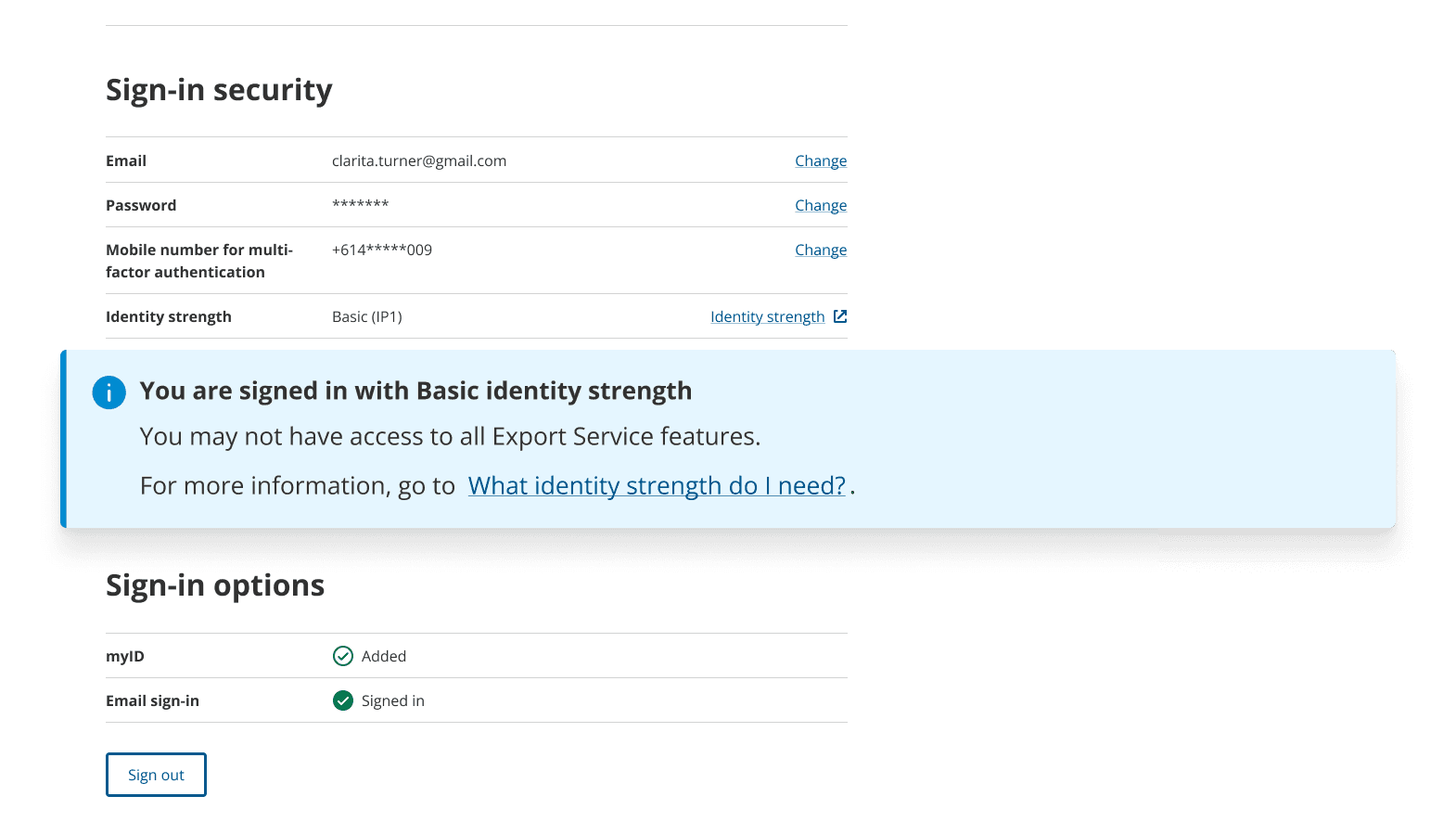
User feedback showed people needed an alternative to Digital ID for signing in or creating accounts. While the department wanted to offer this secondary option, it created confusion—users assumed both sign-in methods gave them equal access to services.
Our solution: We added clear callouts and help content explaining that Digital ID unlocks access to more services within the Export Service than the alternative method.
To deliver the 'Email sign-in' feature, I worked with a business analyst in Mural to map out the multi-factor authentication user journey and ensure it met essential security requirements. To do this we baselined it against the product offered by Microsoft azure B2C.
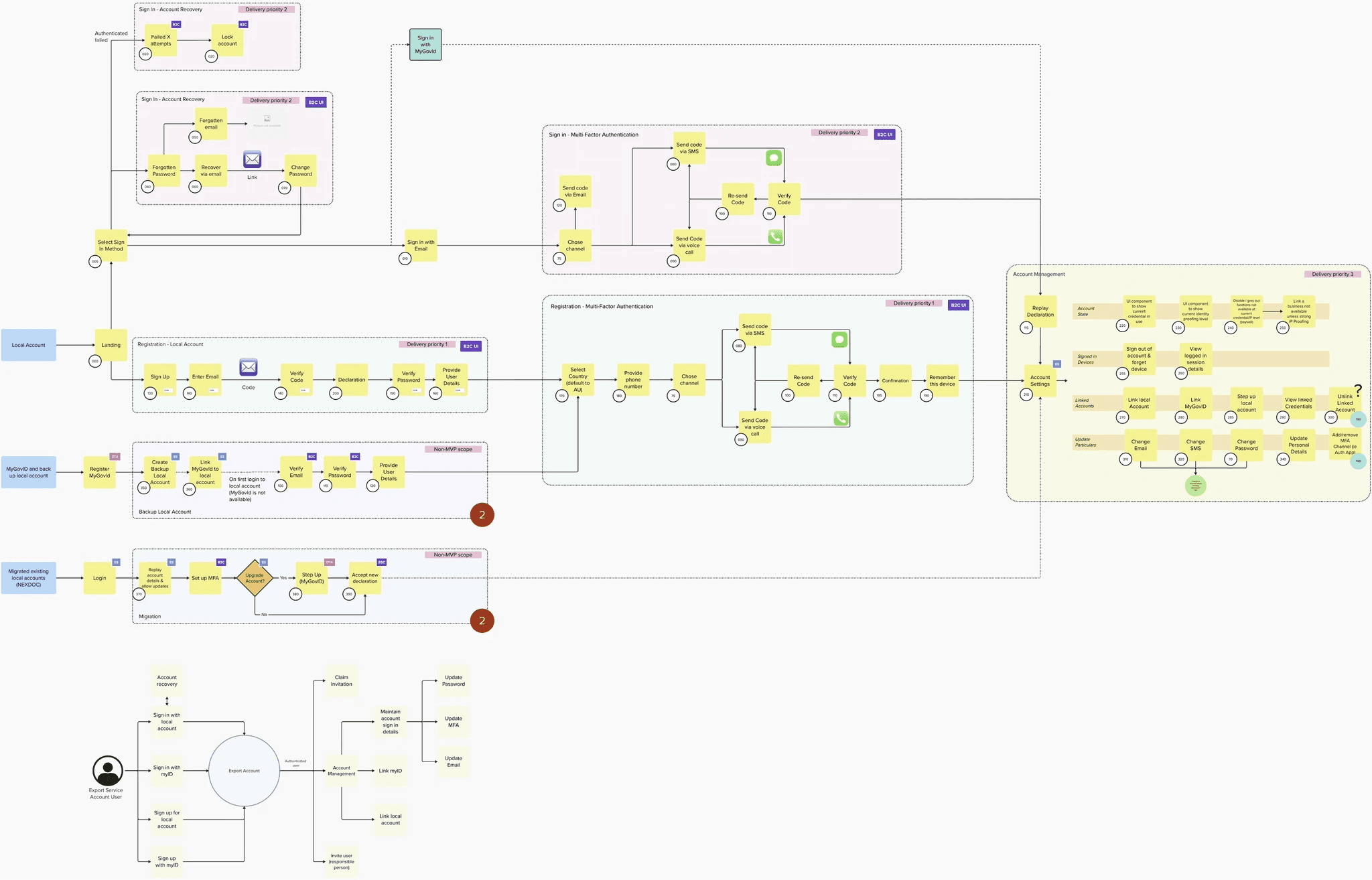
I translated the multi-factor authentication journey into screen designs, which were implemented using Microsoft Azure B2C (a white-label authentication solution).
Since we couldn't use the Design System's React UI library, the interface had to be built in HTML and CSS. I created detailed design documentation to guide development. The solution initially produced inconsistent layouts and elements, so I worked closely with developers—providing specific feedback to refine visual hierarchy, improve usability, and strengthen accessibility.

Designing for secure access
While onboarding, business managers needed a way to seamlessly verify their business while preventing unauthorised access. Our solution integrates with the whole-of-government capability, Relationship Authorisation Manager (RAM). Because the business linking process involves multiple redirects between government applications, which could easily disorient users, we introduced a task overview to set expectations and guide them through the process.
Other key user requirements:
Enter business details once and reuse them across the service.
Provide managers with simple controls for team permissions and access.
Enable users to manage multiple businesses or entities from a single account.
Content strategy
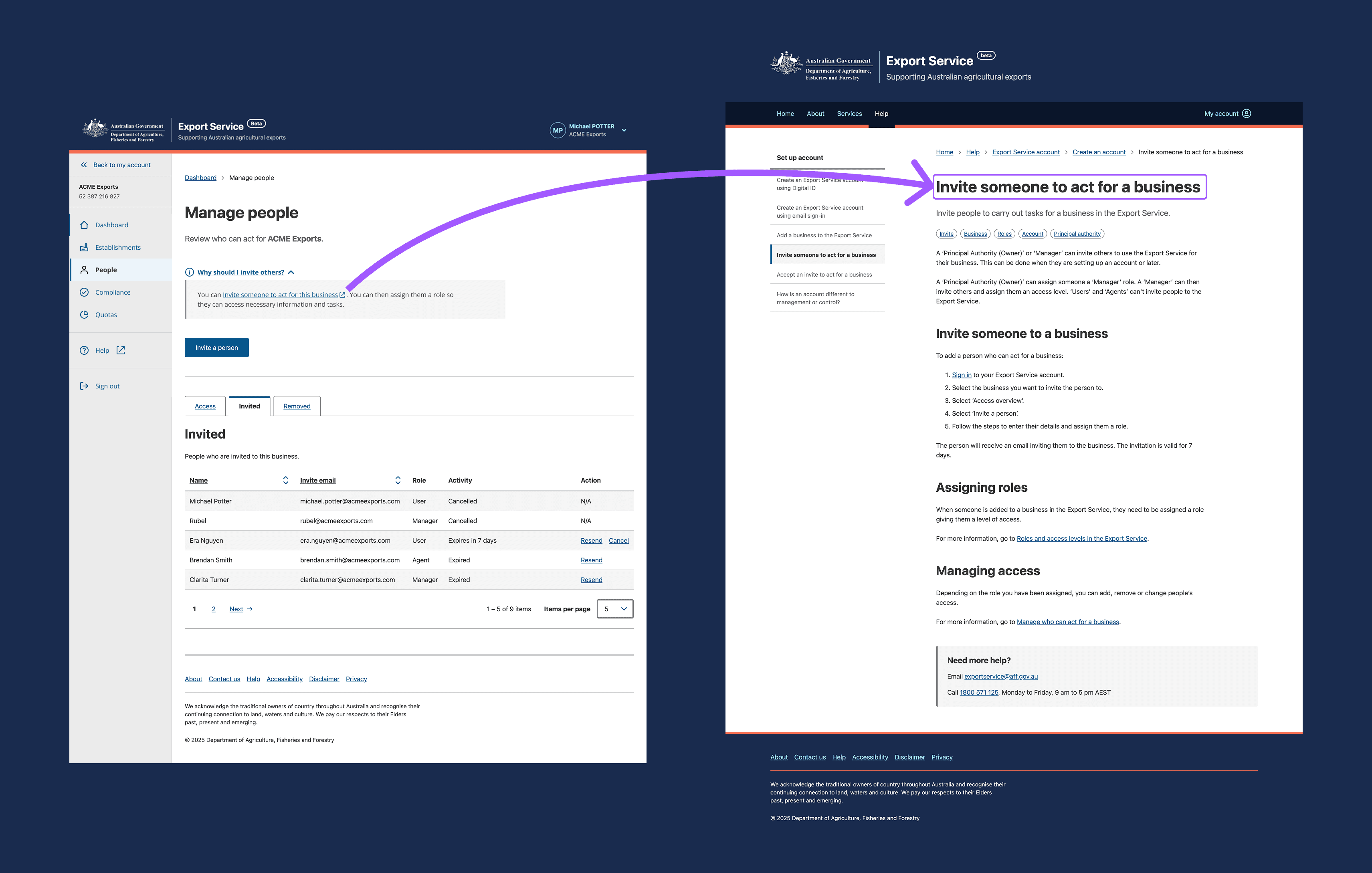
Clear guidance was critical to this project's success. Security requirements in regulatory environments are often frustrating and complex for users. By providing the right information at the right moment, we helped users understand that security controls are valuable business tools not just obstacles to government services.
I collaborated with content designers to create 20+ help articles that translated technical requirements into plain language.
Form validation and designing for errors
As a security requirement, invited users had to verify their invitation with an email code rather than a clickable link. Several issues could occur when redeeming a code—it might be expired, cancelled by the sender, or already used.
Error messages needed to strike a careful balance: general enough to avoid exposing system vulnerabilities to bad actors, while still being specific enough to help legitimate users resolve the issue.
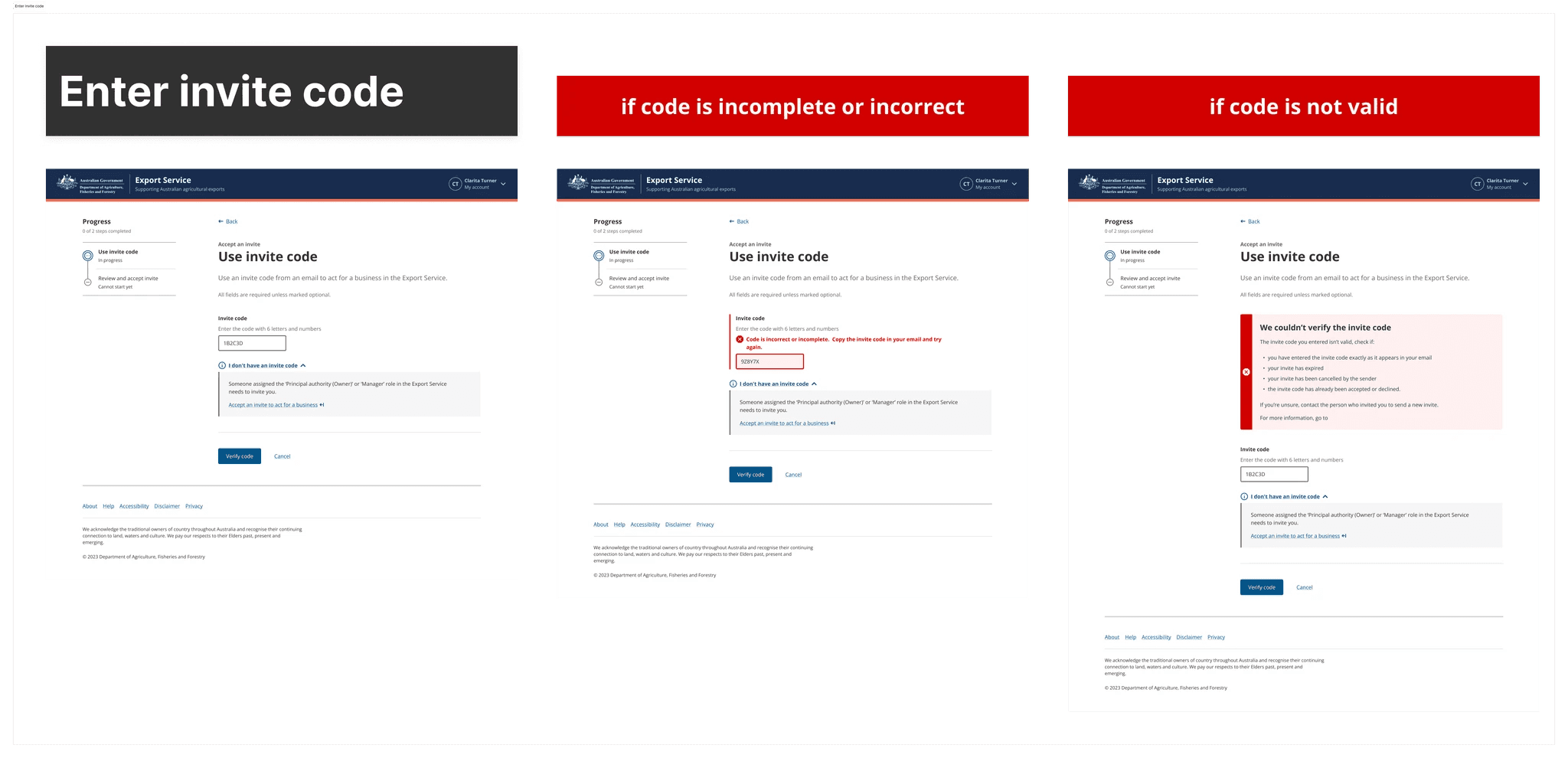
To design effective error handling, I worked with the technical team to catalogue all possible error states and classify them as either system-generated or user-generated. This classification informed how we wrote and displayed each message.
Our front-end developers preferred having error state mockups positioned directly next to the main user flow designs in Figma. We also documented these rules and messages in detailed build tickets to support implementation and testing.
Impact
Our team delivered a comprehensive web and mobile solution that transformed how exporters interact with government services. Exporters now have a single login and centralised profile management, eliminating the frustration of managing multiple accounts. Businesses can onboard faster and operate with confidence.
The department gains digital assurance, while regulators have secure access to verified, up-to-date user information. This enables faster onboarding, more efficient service delivery, and higher user satisfaction.
Next Project